
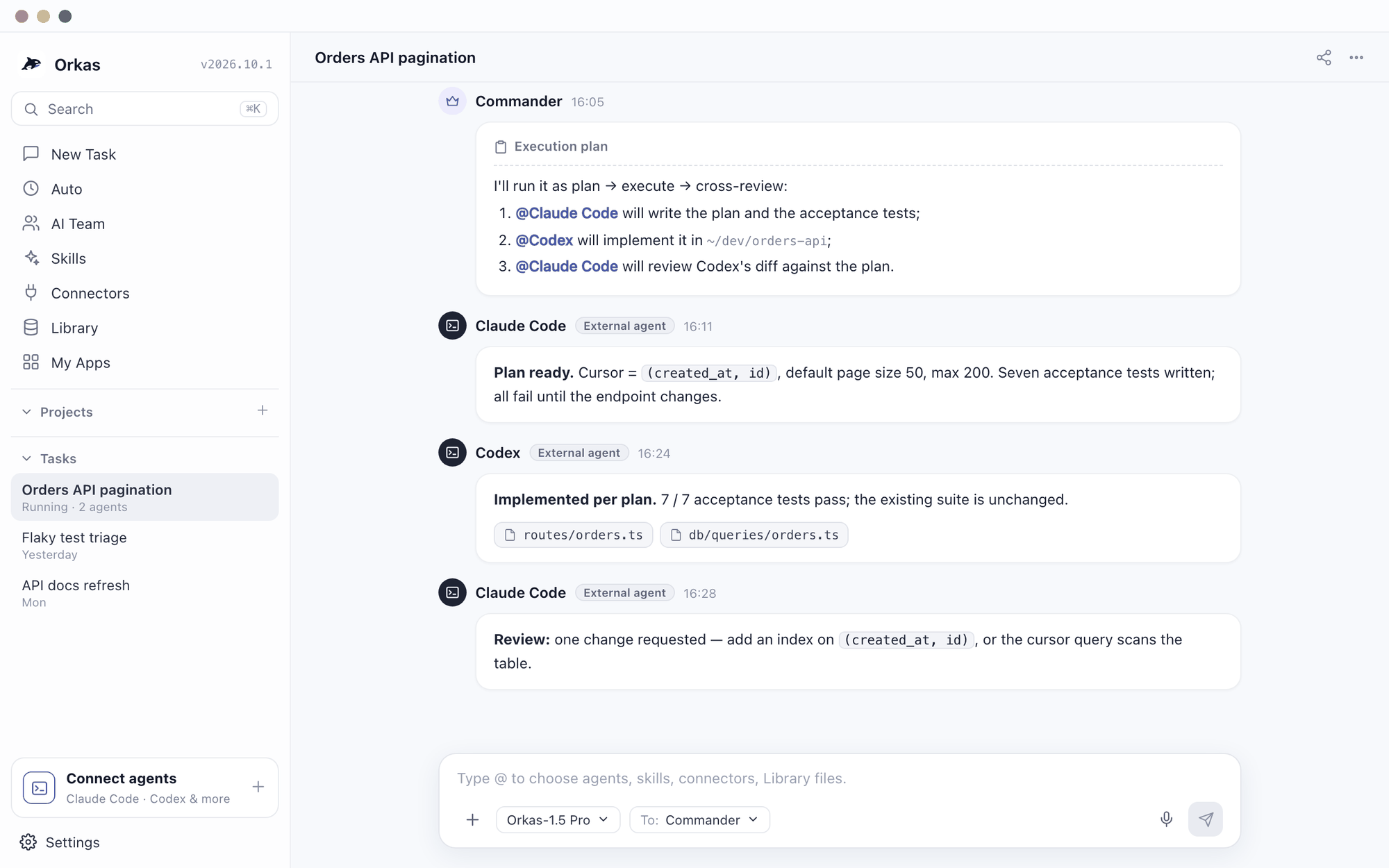
If you write code with AI in 2026, there's a good chance you keep both Claude Code and OpenAI Codex within reach. They are both terminal-based coding agents, and it's tempting to frame it as Claude Code vs Codex — which is better? In practice the more useful question is: how do I run Claude Code and Codex together, without becoming the human message bus copying context between two terminals?
Short answer: you can, and there are three ways to do it. The manual way — two terminals, a shared context file, and git worktrees — works today. If you already work inside Claude Code, OpenAI's official Codex plugin lets you call Codex from there. And the simplest way to run both as equals is to put one orchestrator in front of them. This post covers all three.
Three ways to run Claude Code and Codex together
Here is how the three compare before the details. Each one has its own section below.
| Way | How it works | Best for | Watch out for |
|---|---|---|---|
| Two terminals | You run both CLIs side by side and share context through a file and git worktrees. | An occasional cross-review on one repository | You carry the context and merge the results by hand. |
| Orkas | A desktop app runs both CLIs as agents in one chat, and a Commander hands them work in parallel. | Both agents working at once on separate pieces, plus the non-code work around them | Agents don't get their own git worktree automatically, and the app has to stay open. |
| OpenAI's Codex plugin for Claude Code | Claude Code stays your session, and slash commands call Codex for a review or a task you hand over. | People who already work inside Claude Code | Codex is a helper inside Claude Code, not a peer, and the optional review gate can use up your limits quickly. |
Claude Code vs Codex: which is better at what
Neither one dominates the other; they have different shapes, and running them together means using each for its strength:
- Claude Code tends to shine at understanding an existing codebase: reading unfamiliar code, explaining architecture, making careful multi-file edits, and reviewing a diff for what it will actually break.
- Codex tends to shine at fast, well-scoped execution: scaffolding a new feature, generating boilerplate, and grinding through a clearly-defined ticket quickly.
So "which is better" is the wrong question. The interesting workflow is planning and review with one, execution with the other — and, ideally, each catching the other's mistakes.
Weighing Codex against OpenCode instead? Codex vs OpenCode, side by side →
The manual way: two terminals, one shared context
Both tools install as CLIs and run in any project directory:
npm install -g @anthropic-ai/claude-code   # then: claude
npm install -g @openai/codex               # then: codex
The trick to running them on the same project is to give them a shared source of truth and keep them out of each other's way:
- Keep a living
PROJECT_CONTEXT.mdin the repo that both agents read and update, so a plan written by one is visible to the other. - Use git worktrees so each agent works on its own branch in its own directory — they never fight over the same files.
git worktree add ../feature-claude feature/claude
git worktree add ../feature-codex  feature/codex
# run `claude` in one, `codex` in the other; review and merge the diffs
This works. The catch is that you are the integration layer: you paste Claude Code's plan into Codex, paste Codex's diff back into Claude Code, and reconcile the results by hand.
A workflow that actually works: plan → execute → cross-review
The most reliable pattern people land on is a small assembly line across the two agents:
1. Claude Code  — read the code, write a plan (files, steps, risks)
2. Codex        — implement the plan fast, produce a diff
3. Claude Code  — review Codex's diff: correctness, edge cases, style
4. loop on anything the review flags
Two independent models reviewing each other's work catches a class of mistakes that a single agent, marking its own homework, will happily miss. The cost is coordination overhead — which is exactly the part worth automating.
The friction: you're the orchestrator
Everything above works, and for a one-off task it's fine. Done daily, the manual approach quietly turns you into the orchestrator: routing each task to the right agent, carrying context between them, reconciling two diffs, and keeping a mental model of who did what. That's real work, and it's the same coordination problem whether you're juggling two coding agents or twenty.
How Orkas runs Claude Code and Codex together
Orkas is an open-source, local-first desktop app that turns that manual dance into a built-in feature. It can run local CLI coding agents for you — Claude Code, Codex, OpenClaw, OpenCode, and Hermes — and coordinate them from one chat. Setup is short:
1. Install and sign in to the `claude` and `codex` CLIs on your machine
2. In Orkas: new chat → add an agent → "External" tab → pick a CLI
   (Orkas only lists the CLIs it detects on your PATH)
3. Do it twice — one Claude Code agent, one Codex agent
4. Optionally set a project directory per agent, and a model
   (leave the model blank to use each CLI's own default)
Orkas doesn't reimplement or wrap the models. It runs your real, already-installed claude and codex binaries as subprocesses, using the credentials you've already logged into them with. It manages the coordination, not the keys.
One Commander, both agents, in parallel
Now you have two specialist agents in one conversation. Ask the lead Commander for something and it routes the pieces — it can hand the "understand and plan" slice to Claude Code and the "implement fast" slice to Codex. When the Commander fans several hand-offs out in a single turn, Orkas runs them concurrently (a few at a time), so Claude Code and Codex work at the same time instead of you tabbing between terminals. You can also just @-mention either agent directly. We wrote up how this orchestration works in Multi-Agent Orchestration in Practice.
There's a bonus two bare terminals can't give you: when Orkas runs Claude Code or Codex, it also exposes itself back to them over a local bridge. The coding agent can reach Orkas's connected tools and knowledge — your GitHub, Notion, or Google Workspace connectors and your knowledge base — from inside its own run, not just the files in the repo.
When Claude Code or Codex hits its usage limit
Both CLIs run on usage limits tied to your plan, and a long task can hit one halfway through. You can wait for the reset. If you pay for both, you can also hand the task to the other agent: Claude Code's limits and Codex's come from two separate plans, so when one runs out, the other usually still has room.
The hand-off works because the work lives in the project folder, not inside either agent's session. On October 20, 2026 we tried it with the two CLIs on a small Python tool. Claude Code built the first half, with tests, and stopped, leaving a short progress note: what was done, what was left and which decisions to keep. Codex, started fresh in the same folder, read the note, kept those decisions, built the rest and ran the whole suite: 14 tests, all passing. The note is what made it work, so ask whichever agent starts first to keep one as it goes.
In Orkas the same hand-off happens in one conversation. Both agents work in the same project folder, both get the project's goals and rules and its memory with every run, and both can read the project's to-dos. When Claude Code stops with “Current usage limit reached”, @-mention your Codex agent and ask it to carry on from the note. It also sees the conversation's recent messages, so you don't paste anything across.
Two things Orkas doesn't do: it doesn't add usage to either plan, and it doesn't switch agents for you; you decide when to hand over. With recent versions of both CLIs, each agent's page in Orkas shows how much of every usage window is left and when it resets.
The official shortcut: OpenAI's Codex plugin for Claude Code
If Claude Code is where you already work, OpenAI has shortened part of this loop. Its Codex plugin for Claude Code (codex-plugin-cc, Apache-2.0) installs from inside a Claude Code session:
/plugin marketplace add openai/codex-plugin-cc
/plugin install codex@openai-codex
/reload-plugins
/codex:setup
It adds /codex:review for a read-only review of your current changes, /codex:adversarial-review for a review you point at a specific design decision, and /codex:rescue to hand a task to Codex, plus /codex:status, /codex:result and /codex:cancel for work running in the background. It runs through the Codex CLI and app server on your own machine — the same install, login and checkout you would use directly — and needs a ChatGPT plan (the Free plan included) or an OpenAI API key.
That turns the cross-review above into a command instead of a copy-paste. It does not change the shape of the setup: Claude Code stays the session you work in, and Codex is called into it for a review or for a task you hand over. OpenAI's README also warns that the plugin's optional review gate can keep the two looping and use up your limits quickly. If you would rather have both agents working as peers — each on its own task, at the same time, reporting to one place — that is the Orkas setup described above.
What changed with Claude Code Projects
Since September 17, 2026, Claude Code has a Projects beta: a coordinator hands a goal to parallel threads, and each thread is a Claude Code cloud session on its own branch. That covers running several Claude Code agents at once. It does not bring Codex in. Every thread is Claude Code, and the threads run in Anthropic's cloud rather than on your machine. If you want Claude Code and Codex on the same job, you still need one of the three ways in this post.
More on how Projects works and where it stops: Claude Code Projects explained →
A few things to get right
- You bring the CLIs and their logins. Orkas spawns
claudeandcodex; it does not manage API keys or sign-in. Install them and log in first, on a recent version (roughly Claude Code 2.0+ and Codex 0.100+). - Point them at different directories to parallelize safely. Orkas doesn't isolate each agent in its own git worktree — if both point at the same folder and run at once, they edit the same files concurrently. Give each its own project directory or repo for true parallel work.
- You choose how much they do on their own. Each CLI agent runs at a permission level you set in AI Team > agent > Runtime settings > Permission level: Use CLI default, Ask for permission, or Full access. Use CLI default preserves the CLI's own permission settings. Ask for permission enables approval requests; Full access skips the CLI's approval prompts. Connector permissions are separate: sensitive actions ask for approval unless you already authorized that connection for the task or enabled Trusted mode in Orkas.
So — Claude Code or Codex?
Both. Use Claude Code for understanding, architecture, and review; use Codex for fast, well-scoped execution; and let one Commander route between them so you're steering the work instead of shuttling it. That's the point of running them together rather than picking a winner.
Local-first means your repository and your keys stay on your machine — see What Is Local-First AI? To skip the two-terminals dance, download Orkas and point one Commander at both Claude Code and Codex.
Claude Code and Codex together: FAQ
Can you use Codex and Claude Code together?
Yes. They are separate CLIs with separate session state, so nothing stops you running both against the same repository. The work is keeping them from editing the same files at the same time — either with git worktrees, or by letting one commander hand each task to one agent.
Do Claude Code and Codex talk to each other?
Not on their own. Claude Code reads CLAUDE.md and Codex reads AGENTS.md, and neither watches the other's session. The exception is OpenAI's Codex plugin for Claude Code, which lets a Claude Code session call Codex for a review or a delegated task. Otherwise, anything they share has to go through a file you both write to, or through an orchestrator that carries the result of one into the prompt of the other.
Is there a Codex plugin for Claude Code?
Yes. OpenAI publishes one, codex-plugin-cc. Inside Claude Code, run /plugin marketplace add openai/codex-plugin-cc and /plugin install codex@openai-codex, then /codex:setup. It adds commands for Codex reviews and for handing Codex a task, runs through the Codex CLI on your machine, and needs a ChatGPT plan (Free included) or an OpenAI API key.
What is the best way to use Codex and Claude Code together?
Split by strength rather than by file: let Claude Code plan and review, let Codex execute a scoped change, then have the other one read the diff. The review pass catches more than running either agent twice.
How do you make Codex and Claude Code work together?
Manually it takes two terminals, a shared spec file, and a git worktree per agent so their edits do not collide. In Orkas both run as local sessions under one Commander, which dispatches the task and collects both diffs into the same chat.
Can you run Claude Code and Codex at the same time on the same project?
You can run them in parallel, but don't point both at the same folder at once — they will edit the same files concurrently. Give each agent its own git worktree or its own project directory. Orkas does not isolate agents into separate worktrees for you, so that step is yours either way.
Can you run Claude Code and Codex in one terminal?
Not as two interactive sessions — each CLI wants its own TTY. In practice you either split the terminal with tmux, or let an orchestrator run both as local sessions and collect their output in one place. Orkas takes the second route: both CLIs run under one Commander and report into the same chat.
Can you orchestrate more than just Claude Code and Codex?
Yes. Orkas drives five local CLI agents — Claude Code, Codex, OpenCode, OpenClaw, and Hermes. Whichever ones you have installed show up, and a single Commander can mix them on the same project.
Does Claude Code Projects work with Codex?
No. Claude Code Projects coordinates Claude Code cloud sessions only. To run Claude Code and Codex on the same task you need the Codex plugin, a manual setup with git worktrees, or an orchestrator such as Orkas that runs both on your computer.
Do you need paid plans for both Claude Code and Codex?
Each CLI uses its own login and its own plan. Orkas only spawns the binaries you already have — it does not manage API keys, sign-in, or billing for either one.
What do you do when Claude Code or Codex hits its usage limit?
Wait for the limit to reset, or hand the task to the other agent, since the two limits come from separate plans. Keep a short progress note in the project folder (what is done, what is left, which decisions to keep) so the other agent can pick up from it. In Orkas both agents share the project folder and the conversation, so you @-mention the other one to continue.